Monthly Archive for July, 2010

IPv6 and ip6tables

I describe a little bit how to secure your IPv6 server with Netfilter-ip6tables.

Refer to the IANA message types.

My example IPv6 firewall script:

Earlier predefined variables:

1
2
IPT6="/sbin/ip6tables"
OUTER="eth0"
1
2
3
4
5
6
7
8
9
10
11
12
13
14
15
16
17
18
19
20
21
22
23
24
25
26
27
28
29
30
31
32
33
34
35
36
37
38
39
40
41
42
43
44
45
46
47
48
49
50
51
52
# Clean old IPv6 firewall
$IPT6 -F
$IPT6 -X
 
# Clean old iptables v6 tables
for chain in mangle filter
do
    $IPT6 -t $chain -F
    $IPT6 -t $chain -X
done
 
# Set IPv6 default chains
$IPT6 -P INPUT DROP 
$IPT6 -P FORWARD DROP
$IPT6 -P OUTPUT ACCEPT
 
$IPT6 -A INPUT -i $OUTER -m state --state RELATED,ESTABLISHED -j ACCEPT
 
$IPT6 -A INPUT -i lo -j ACCEPT
 
# Allow SSH from Hetzner IPv6-NET
$IPT6 -A INPUT -s 2001:470:1f0b:1604::/64 -i $OUTER -p tcp -m tcp --dport 22 -j ACCEPT
 
# Allow SSH from Home IPv6-NET
$IPT6 -A INPUT -s 2001:470:1f0b:1514::/64 -i $OUTER -p tcp -m tcp --dport 22 -j ACCEPT
 
# Allow ICMP from Hetzner IPv6-NET
$IPT6 -A INPUT -p ipv6-icmp -m icmp6 --icmpv6-type 128 -m limit --limit 15/sec -s 2001:470:1f0b:1604::/64 -j ACCEPT
$IPT6 -A INPUT -p ipv6-icmp -m icmp6 --icmpv6-type 129 -m limit --limit 15/sec -s 2001:470:1f0b:1604::/64 -j ACCEPT
 
# Allow ICMP from Home IPv6-NET
$IPT6 -A INPUT -p ipv6-icmp -m icmp6 --icmpv6-type 128 -m limit --limit 15/sec -s 2001:470:1f0b:1514::/64 -j ACCEPT
$IPT6 -A INPUT -p ipv6-icmp -m icmp6 --icmpv6-type 129 -m limit --limit 15/sec -s 2001:470:1f0b:1514::/64 -j ACCEPT
 
$IPT6 -A INPUT -i $OUTER -p tcp -m tcp --dport 25 -j ACCEPT     # SMTP  
$IPT6 -A INPUT -i $OUTER -p tcp -m tcp --dport 53 -j ACCEPT     # DNS via TCP
$IPT6 -A INPUT -i $OUTER -p udp -m udp --dport 53 -j ACCEPT     # DNS via UDP
$IPT6 -A INPUT -i $OUTER -p tcp -m tcp --dport 80 -j ACCEPT     # HTTP
$IPT6 -A INPUT -i $OUTER -p tcp -m tcp --dport 110 -j ACCEPT    # POP3
$IPT6 -A INPUT -i $OUTER -p tcp -m tcp --dport 143 -j ACCEPT    # IMAP
$IPT6 -A INPUT -i $OUTER -p tcp -m tcp -s 2001:470:1f0b:1604::3/64 --dport 4949 -j ACCEPT
 
$IPT6 -A INPUT -p ipv6-icmp -m icmp6 --icmpv6-type 133 -m hl --hl-eq 255 -j ACCEPT
$IPT6 -A INPUT -p ipv6-icmp -m icmp6 --icmpv6-type 134 -m hl --hl-eq 255 -j ACCEPT
$IPT6 -A INPUT -p ipv6-icmp -m icmp6 --icmpv6-type 135 -m hl --hl-eq 255 -j ACCEPT
$IPT6 -A INPUT -p ipv6-icmp -m icmp6 --icmpv6-type 136 -m hl --hl-eq 255 -j ACCEPT
$IPT6 -A INPUT -p ipv6-icmp -m icmp6 --icmpv6-type 137 -m hl --hl-eq 255 -j ACCEPT
 
$IPT6 -A INPUT -m state --state RELATED,ESTABLISHED -j ACCEPT
 
# Example of logging
$IPT6 -A INPUT -p ipv6-icmp -j LOG --log-prefix "Dropped ICMPv6 Packets "

Nmap IPv6 addresses

When conducting a penetration test against an IPv6 enabled system, the first step is to determine what services are accessible over IPv6. Then you should close unnecessary ports for third persons ; for example SSH.

Consider the Nmap results below

Easy portscan syntax:

1
root@acer:~# nmap -6 2001:470:1f0b:1604::3

A little bit complexer syntax without DNS resolution, and a predefined port range:

1
root@acer:~# nmap -6 -p1-10000 -n 2001:470:1f0b:1604::3 -PN

Output:

1
2
3
4
5
6
7
8
9
10
11
12
13
14
15
Starting Nmap 5.00 ( http://nmap.org ) at 2010-07-24 19:16 CEST
Interesting ports on 2001:470:1f0b:1604::3:
Not shown: 9989 closed ports
PORT    STATE    SERVICE
21/tcp  open     ftp
22/tcp  open     ssh
53/tcp  open     domain
80/tcp  open     http
110/tcp open     pop3
143/tcp open     imap
443/tcp open     https
623/tcp filtered unknown
664/tcp filtered secure-aux-bus
993/tcp open     imaps
995/tcp open     pop3s

Kernel modules

It’s sometimes useful to prevent some kernel modules from loading. This howto will show you how to do this. This is really easy to do, so if you want you can just skip to the end to see some examples.

Load manualy kernel modules:

1
modprobe ip_conntrack_ftp

List all loaded modules:

1
lsmod

This option remove loaded module:

1
modprobe -r pcspkr

Creating a blacklist:

1
2
cat /etc/modprobe.d/blacklist-custom
blacklist pcspkr

Persistent IPv6 Address

I show you, how to add a secondary IPv6 Address to your existing one.
You need only to edit “vim /etc/network/interfaces” file and add the IPv6 networking configuration.

1
2
3
4
5
6
7
8
9
10
11
12
13
# The loopback network interface
auto lo
iface lo inet loopback
 
# The primary network interface
auto eth0
iface eth0 inet static
 address 10.1.100.4
 gateway 10.1.100.1
 netmask 255.255.255.0
 pre-up modprobe ipv6
 post-up ip addr add 2001:470:1f0b:1514::4/64 dev eth0 
 post-up ip route add default via 2001:470:1f0b:1514::1 dev eth0

Another way to do the same:

1
2
3
4
5
6
pre-up modprobe ipv6
 
iface eth0 inet6 static
 address 2001:470:1f0b:1514::4
 netmask 64
 gateway 2001:470:1f0b:1514::1

Also you can put the ipv6 module in to “/etc/modules” instead of “pre-up modprobe ipv6″

Test it:

1
ping6 ipv6.google.com

Some complexe example:

1
2
3
4
5
6
7
8
9
10
11
12
13
14
15
16
17
18
19
20
21
22
23
24
25
26
27
28
# The loopback network interface
auto lo
iface lo inet loopback
 
# The primary network interface
allow-hotplug eth0
iface eth0 inet static
        address 188.40.116.234
        netmask 255.255.255.0
        network 188.40.116.0
        broadcast 188.40.116.255
        gateway 188.40.116.206
 
auto eth0:1
iface eth0:1 inet static
        address 192.168.2.70
        netmask 255.255.255.0
 
# IPv6 over tunnel-broker
auto he-ipv6
iface he-ipv6 inet6 v4tunnel
 endpoint   216.66.80.30
 ttl        255
 address    2001:470:1f0a:1604::2
 netmask    64
 mtu        1480
 post-up ip addr add 2001:470:1f0b:1604::1/64 dev eth0
 post-up ip route add ::/0 dev he-ipv6

Windows 7 and IPv6

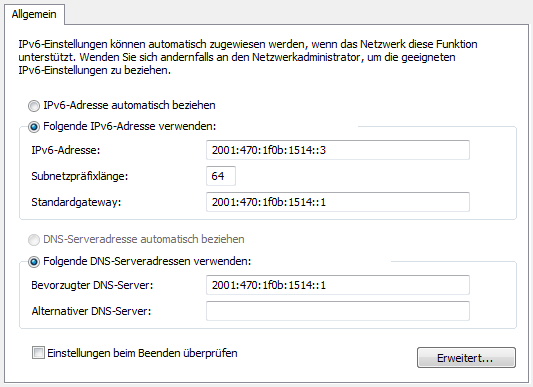
IPv6 has been “the ultimate next generation of TCP/IP protocols” for so long that you can be forgiven for thinking that it will never be useful. However, with Windows 7, developer of Microsoft has finally given network administrators and normal users a reason to consider using IPv6.

This screen shot shows you, how easy it is to configure IPv6 address: