

Another really helpful check for your Icinga or Nagios instance.
If your have any windows machines you can check the Windows Update-State. How many Updates you need to install and if you need to reboot your servers after updating them.
Get the Update Script.
Copy the Script to “C:\Program Files\NSClient++\scripts\”
Uncomment the NRPEListener.dll and CheckExternalScripts.dll parameters in your NSC.ini config:
In the [NRPE] section
uncomment following options:
1 2 3 4 5 | port=5666 command_timeout=60 allow_arguments=0 use_ssl=1 socket_timeout=30 |
[External Scripts] section:
1 | check_win_updates=cscript.exe //T:40 //NoLogo scripts\test-updates.wsf /w:1 /C:10 |
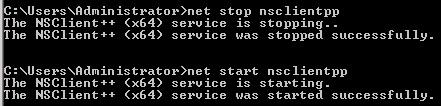
Restart NSClient Service:
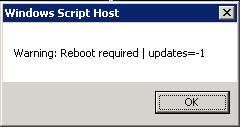
Check the script from windows command line (CMD- the black window;)):

Icinga output (click to resize):

The result (after I installed some Updates:-)) (click to resize):

Icinga-side configurations:
Command definition:
1 2 3 4 | define command { command_name check_win_updates command_line /usr/lib/nagios/plugins/check_nrpe -H $HOSTADDRESS$ -p 5666 -c check_win_updates } |
Service definition:
1 2 3 4 5 6 | define service { hostgroup_name check-win-updates service_description Windows Updates check_command check_win_updates use generic-service } |
Hostgroups definition:
1 2 3 4 5 | define hostgroup { hostgroup_name check-win-updates alias Windows Updates members windows2008r2, windows7 } |
Check icinga-config and restart the process:
1 | icinga -v /etc/icinga/icinga.cfg && service icinga reload |
test-updates.wsf is not valid ?
correcting – but still troubles – recieve :
No handler for command: cscript.exe