One best friend has two apartments not far away from each other, the typical human idea was to pay only for one internet connection and connect the another apartment over WLAN.
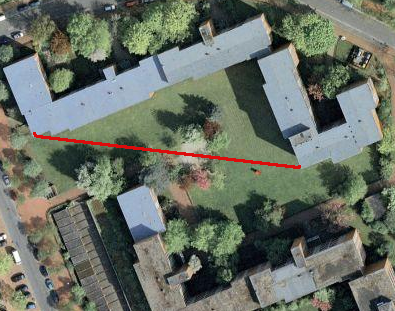
A little map of the area (the red line [Read more…]

Linux, programming and more
One best friend has two apartments not far away from each other, the typical human idea was to pay only for one internet connection and connect the another apartment over WLAN.
A little map of the area (the red line [Read more…]
Q: Which three application layer protocols use TCP? (Choose three.)
A: SMTP
A: FTP
SNMP
A: HTTP
TFTP
DHCP
Q: Which two application layer protocols use the UDP protocol? (Choose two.)
Telnet
A: SNMP
SMTP
SQL
A: TFTP
Q: What are two functions that occur at the Internet layer of the TCP/IP model? (Choose two.)
establishment of logical connections between source and destination hosts
A: end-to-end flow control
determination of best paths through the network
definition of the procedures used to interface with the network hardware
A: packet switching
Layer 5 and Layer 6 OSI model functions
Q: What are three examples of TCP/IP application layer protocols? (Choose three.)
A: a terminal emulation protocol that supports remote console connections with various network devices
A: a protocol responsible for transporting electronic mail on TCP/IP networks and the Internet
A: a protocol that exchanges network management information between a network device and a management console
Q: Refer to the exhibit. The exhibit shows simplified protocol data units from different OSI model layers. Which three statements are true
about the PDUs and the encapsulation process?
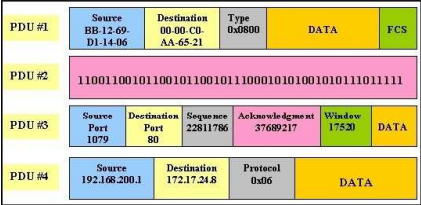
A: PDU #1 is a frame.
A: PDU #3 is a segment.
A: The order in which these PDUs are created during the encapsulation process is 3, 4, 1, 2.
[Read more…]
Q: What is the purpose of the Spanning Tree Protocol (STP)?
A: prevents Layer 2 loops
Q: What creates a loop-free path through a switch network?
A: Spanning Tree Protocol
Q: Which statement is true regarding states of the IEEE 802.1D Spanning Tree Protocol?
A: Ports listen and learn before going into the forwarding state.
Q: Which industry-wide specification was developed to decrease the time that is needed to move to the forwarding state by switch ports that are operating in a redundantly switched topology?
A: RSTP
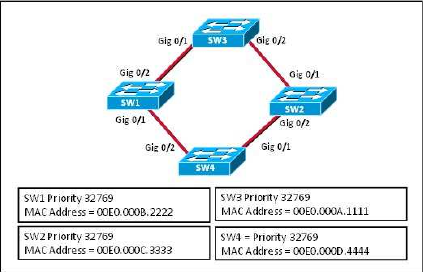
Q: Refer to the exhibit. Which switch will be elected the root bridge and which switch will place a port in blocking mode?
A: SW4 will get a port blocked.
A: SW3 will become the root bridge.

Manual Allocation: The administrator assigns a pre-allocated IP address to the client and DHCP only communicates the IP address to the device.
Automatic Allocation: DHCP automatically assigns a static IP address permanently to a device, selecting it from a pool of available addresses. There is no lease and the address is permanently assigned to a device.
Dynamic Allocation: DHCP automatically dynamically assigns, or leases, an IP address from a pool of addresses for a limited period of time chosen by the server, or until the client tells the DHCP server that it no longer needs the address.
1 2 3 4 5 6 7 | R1(config)# ip dhcp exclude-address 192.168.10.1 192.168.10.9 R1(config)# ip dhcp exclude-address 192.168.10.254 R1(config)# ip dhcp pool LAN-POOL-1 R1(dhcp-config)# network 192.168.10.0 255.255.255.0 R1(dhcp-config)# default router 192.168.10.1 R1(dhcp-config)# domain-name span.com R1(dhcp-config)# end |
Configure DHCP address:
1 2 3 | Eagle(config)# interface fa0/0 Eagle(config-if)# ip address dhcp Eagle(config-if)# no shut |
Configure DHCP relay:
1 2 3 4 | R1# config t R1(config)# interface Fa0/0 R1(config-if)# ip helper-address 192.168.11.5 R1(config-if)# end |
Configure Static NAT
1 | R2(config)#ip nat inside source static 192.168.20.254 209.165.202.131 |
Configure Dynamic NAT Overload
1 2 3 4 5 6 7 8 9 10 | R2(config)#ip nat pool R2POOL 209.165.202.128 209.165.202.130 netmask 255.255.255.252 R2(config)#ip nat inside source list R2NAT pool R2POOL overload R2(config)#interface Serial 0/1/0 R2(config-if)#ip nat outside R2(config)#interface fastEthernet 0/0 R2(config-if)#ip nat inside # optional ISP(config)#ip route 209.165.202.128 255.255.255.224 serial0/0/0 |
IPV6 Dual Stack Configuration:
1 2 3 4 5 | conf t pv6 unicast-routing interface ethernet0 ip address 192.168.99.1 255.255.255.0 ipv6 address 2001:470:1f0b:1514::7/64 |
IPV6 Routing:
1 2 3 4 5 | Router(config)# ipv6 unicast-routing Router(config-if)# ipv6 address ipv6prefix/prefix-length eui-64 DNS Resolver: ip name-server 2001:470:1f0b:1514::1 |