Monthly Archive for August, 2012

VNC client Mac OS X

If you try to find a VNC client on MAC OS X you can spend a lot of time but you will not find it, but it there in the core) But, its hidden, security reasons – for sure;)

Open Finder -> Select Go -> Connect to Server…
or simple ⌘K combination

Now like in this screenshot example:

Its really easy – but all this steps must be hidden to have a great feeling of success – apple;)


Mac OS X OpenVPN with Tunnelblick

Tunnelblick is free opensource GUI for MAC OS X its a great alternative to OpenVPN GUI.

This thread will show you how it is easy to configure and use Tunnelblick, if you used a OpenVPN GUI before you can copy your configuration and your certificate files to your MAC.

You can get Tunnelblick from Continue reading ‘Mac OS X OpenVPN with Tunnelblick’

Gimp Color Key effect

I love photography and it makes fun to manipulate great photos, I show you one effect! Continue reading ‘Gimp Color Key effect’

Certificate Signing Request (CSR) generation instructions

Tutorial for Certificate Signing Request (CSR Request) based on the geotrust knowledge base.

Step 1: Generate a Key Pair

Type the following command at the prompt for a non-encrypted key:

1
openssl genrsa -des3 -out ssl.zeldor.biz.key 2048

Note: When prompted for a pass phrase: enter a secure password and remember it, as this pass phrase is what protects the private key. Both the private key and the certificate are required to enable SSL.

Step 2: Generate the CSR

Type the following command at the prompt to generate the CSR based on the generated key:

1
openssl req -new -key ssl.zeldor.biz.key -out ssl.zeldor.biz.csr

Fix locale issues in Mac OS X

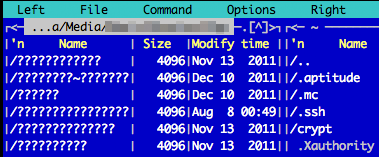
I faced a problem with locales in terminal on Mac OS X Lion. Midnight Commander didn’t want to display Cyrillic symbols in filenames and directories, on my remote media-Server I’ve been getting messages like “warning: setlocale: LC_CTYPE: cannot change locale (UTF-8)”. The solution is fairly simple – add these two lines to ~/.bash_profile (by default is seems to be missing, so create the file):

1
2
3
4
ids:~ id$ cat .bash_profile 
 
export LC_CTYPE=en_US.UTF-8
export LC_ALL=en_US.UTF-8