

DLNA uses Universal Plug and Play (UPnP) for media management, discovery and control.
I love DLNA and last year I wrote a review post about my Silver Stone DC01, which is used to browse everything from my TV. I will try to set up a little Debian Server with analogical usage to the Silver Stone DC 01.
In this post I will use OpenSource DLNA Server MiniDLNA and I install it on Debian squeeze (version 6.0.3).
First you go to sourceforge and Download the latest miniDLNA package.
You can choose between a static or source version which must be compiled.
Compile process:
1 2 3 | tar -xvf minidlna_1.0.22_src.tar.gz cd minidlna-1.0.22/ make |
To be able to compile please install:
1 | apt-get install build-essential |
To compile it you must install some dependencies like libsqlite3-dev libvorbis-dev, make will show them to you.
After successfully compiling process use:
1 | make install |
to install miniDLNA.
Edit MiniDLNA configuration:
1 | vim /etc/minidlna.conf |
You need to fix only the following lines:
1 2 3 4 5 6 7 8 | # Set this to the directory you want to share and scan media_dir=/opt/Samba/Media # Customize the server name that shows up on your clients friendly_name=dc02 # Database folder db_dir=/var/cache/minidlna # Directory for MiniDLNA logs log_dir=/var/log |
BTW this is the original miniDLNA config from Silver Stone DC01:
1 2 3 4 5 6 7 8 | db_dir=/home/.nas log_dir=/home/.nas port=8200 strict_dlna=no friendly_name=dc01 notify_interval=300 enable_tivo=no media_dir=/home/admin/ |
-d flag for debug mode
Debug output – shorted:
1 2 3 4 | [2012/01/07 17:35:19] upnphttp.c:1126: debug: HTTP RESPONSE: HTTP/1.1 200 OK Content-Type: text/xml; charset="utf-8" Connection: close Content-Length: 2211 |
If you have more than one interface in your server (eth0, eth1…) you need to bind the daemon to the interface ip-address otherwise miniDLNA will bind the daemon to eth0 :((:
Example:
1 | minidlna -f /etc/minidlna.conf -a 10.1.100.1 |
By some reasons you can’t compile!?
Try the static version of miniDLNA out:
1 2 3 4 | tar -xvf minidlna_1.0.23_static.tar.gz mv etc/minidlna.conf /etc/ mv usr/sbin/minidlna /usr/sbin/ mkdir /var/cache/minidlna |
Start miniDLNA-Server:
1 | usr/sbin/minidlna -f etc/minidlna-id.conf |
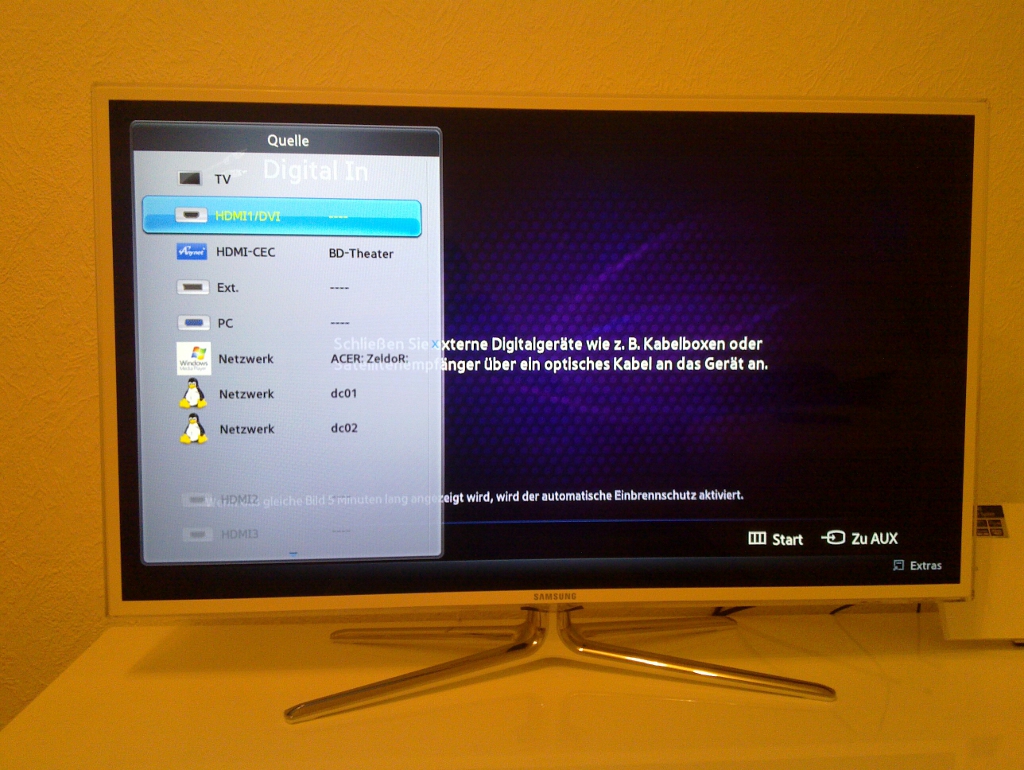
At the time I’m working on a functional init-script for Debian to start the miniDLNA automatically at boot-process.
UPDATE – 12.01.2011
As promised two solutions for automatic start at boot:
The lazy one;):
1 | vim /etc/rc.local |
Content:
1 2 3 4 | if [ -d /opt/Media ]; then minidlna -R -f /etc/minidlna.conf -a 10.1.100.1 fi exit 0 |
Init-script:
1 2 3 4 5 6 7 8 9 10 11 12 13 14 15 16 17 18 19 20 21 22 23 24 25 26 27 28 29 30 31 32 33 34 35 36 37 38 39 40 41 42 43 44 45 46 47 48 49 50 51 52 53 | #!/bin/sh # chkconfig: 345 99 10 # description: Startup/shutdown script for MiniDLNA daemon # # Based on the MiniUPnPd script by Thomas Bernard # Modified for MiniDLNA by Justin Maggard <jmaggard@users.sourceforge.net> # Modified: status-function, another check of the media folder and some useful arguments Igor Drobot # ### BEGIN INIT INFO # Provides: minidlna # Required-Start: $network $local_fs $remote_fs # Required-Stop:: $network $local_fs $remote_fs # Should-Start: $all # Should-Stop: $all # Default-Start: 2 3 4 5 # Default-Stop: 0 1 6 # Short-Description: DLNA-Server ### END INIT INFO MINIDLNA=/usr/sbin/minidlna MEDIADIR=/opt/Media ARGS='-R -f /etc/minidlna.conf -a 10.1.100.1' test -f $MINIDLNA || exit 0 test -d $MIDIADIR || exit 0 . /lib/lsb/init-functions case "$1" in start) log_daemon_msg "Starting minidlna" "minidlna" start-stop-daemon --start --quiet --pidfile /var/run/minidlna.pid --startas $MINIDLNA -- $ARGS $LSBNAMES log_end_msg $? ;; stop) log_daemon_msg "Stopping minidlna" "minidlna" start-stop-daemon --stop --quiet --pidfile /var/run/minidlna.pid log_end_msg $? ;; restart|reload|force-reload) log_daemon_msg "Restarting minidlna" "minidlna" start-stop-daemon --stop --retry 5 --quiet --pidfile /var/run/minidlna.pid start-stop-daemon --start --quiet --pidfile /var/run/minidlna.pid --startas $MINIDLNA -- $ARGS $LSBNAMES log_end_msg $? ;; status) status_of_proc -p /var/run/minidlna.pid $MINIDLNA minidlna && exit 0 || exit $? ;; *) log_action_msg "Usage: /etc/init.d/minidlna {start|stop|restart|reload|force-reload|status}" exit 2 ;; esac exit 0</jmaggard@users.sourceforge.net> |
I am too lazy to read the minidlna documentation, but with workaround should work. Use mount cifs to mount samba share to folder, and then add this folder to minidlna library.
Spook, the service script works fine. After start of minidlan there is more than one process and of course more pids(childs) you seen. But there is still the the main Process-ID which is still the same with /var/run/minidlna.pid
Hi Puck,
thanks a lot for this very useful guide how to bring a minidlna server to live.
I guess I wouldn’t have made it without it.
One question regarding the start|stop script which for me doesn’t seem to work proper.
If I start the script with argument status it always tells me that the minidlna is not running eventhough it definitely is.
I figured that the PID in the /var/run/minidlna.pid file is always wrong and therefore it reports a wron status.
Do you have any idea how to fix it.
Thanks in advance
Michael
Fayaz Yusuf Khan, of course you can install additional the avahi-daemon and avahi-utils. This topic was written only with and for dlna, without another support software.
And why not change the ip-address? If it is the cleverest solution!
No need of specifying the IP address or fixing a static IP. Simply install avahi-daemon and avahi-utils.
Helps me a lot.
Thank you!
Oh and I forgot, to finish up the “add the script to boot” part make sure you chmod 777 /etc/init.d/minidlna and issue the command:
update-rc.d minidlna defaults
Thank you for the great article, you saved me hours of searching.
A bit of help for future readers:
Anyone installing from a bare debian squeeze you have to
add the multimedia repository to your /etc/apt/sources.list
The multimedia repository is:
deb http://www.debian-multimedia.org stable main non-free
Then use this command:
apt-get update && apt-get install debian-multimedia-keyring && apt-get update
In the end you can install the required packages:
apt-get install libavcodec-dev libavformat-dev libavutil-dev libflac-dev libvorbis-dev libogg-dev libid3tag0-dev libexif-dev libjpeg-dev libsqlite3-dev
Hope it helps (: